Tungsten: Turning Neovim into a Scientific Notebook
I built Tungsten because I got tired of the friction between writing math and doing math.
If you write LaTeX regularly, you know the frustration. You are deep in a flow state, writing an assignment or paper in LaTeX. Suddenly, you need to verify a result – perhaps checking a derivative, solving a complex integral or multiplying two matrices.
The workflow breaks immediately.
You Alt-Tab away to a browser, a heavy GUI, or a REPL.
You translate the equation from LaTeX into a different syntax just to get an answer,
Then you Alt-Tab back and manually transcribe the result, hoping you did not switch a sign in the middle of it all.
Not only is this tedious, it is also what I term a thinking tax, a cognitive toll paid not for solving the problem, but merely for managing the workflow. Every context switch costs mental energy, and every manual transcription is an opportunity for error.
So I built Tungsten:
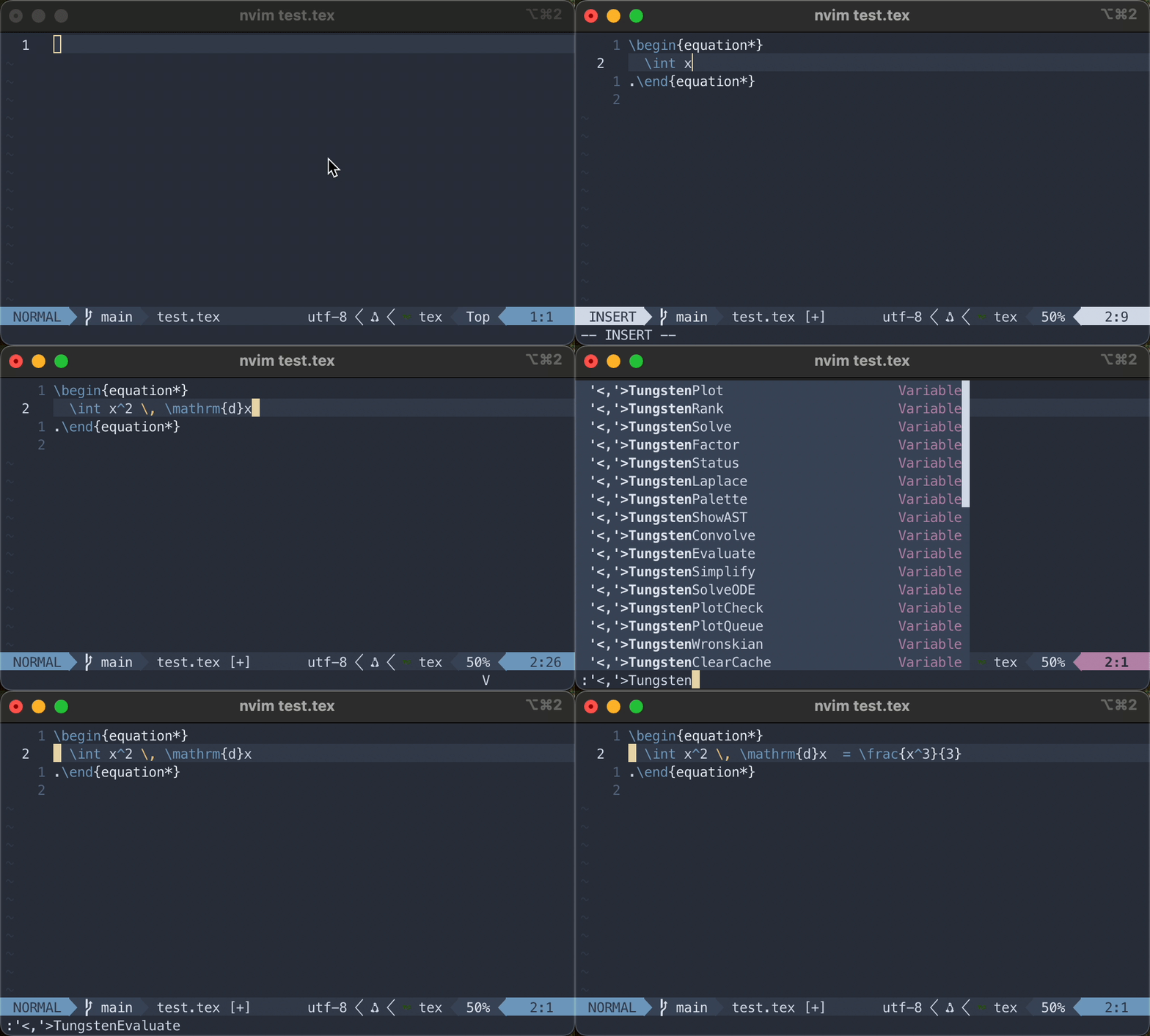
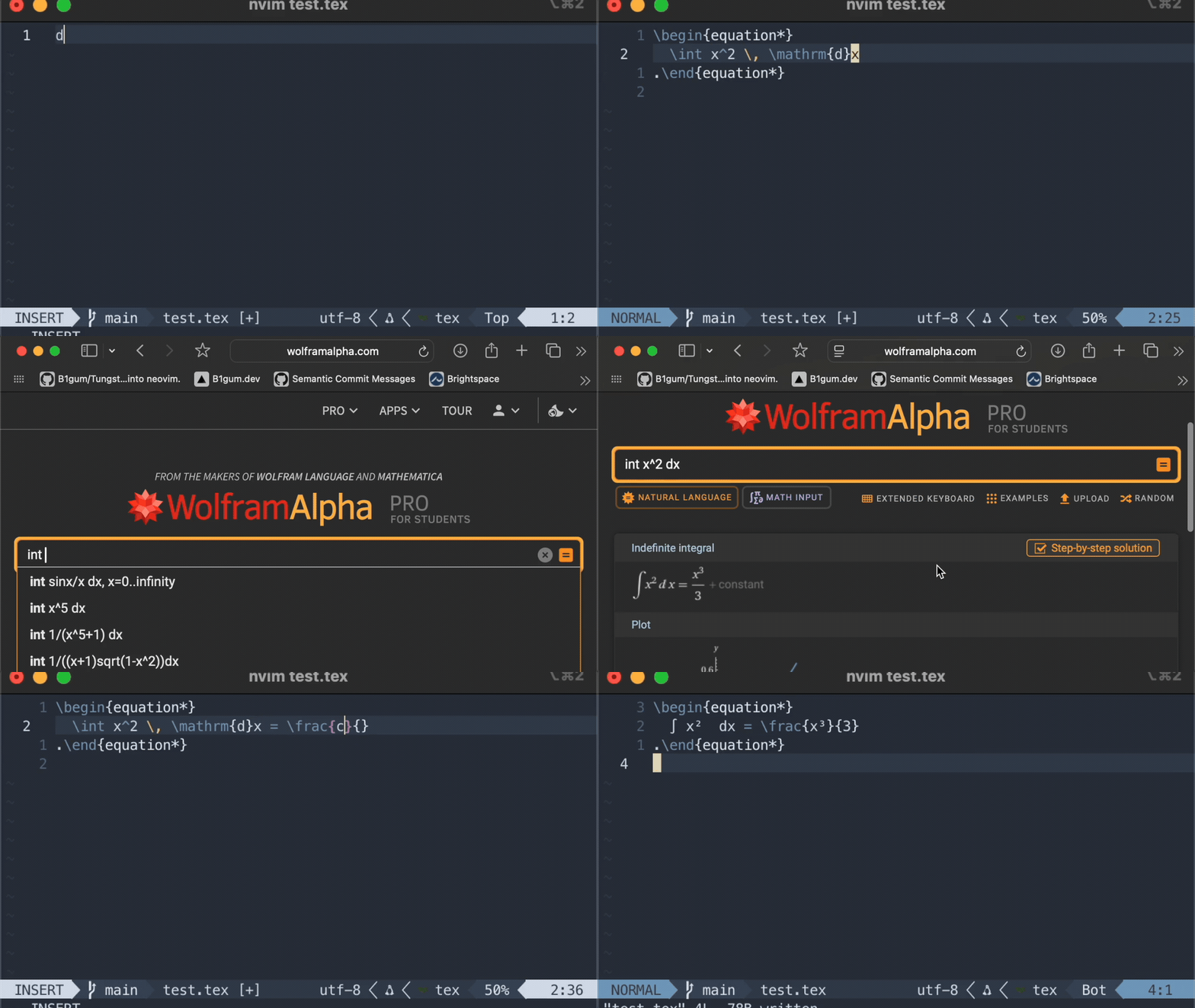
A Notebook Inside your buffer
Think of Tungsten as turning your Neovim buffer into a lightweight computational notebook (like jupyter), but with one crucial difference: The source language is LaTeX.
Existing REPL plugins usually require you to write code – either inside the editor or in a separate IDE – to get an evaluation. But if you are writing a paper, an assignment, or is sitting at an exam, you do not want to switch to Python/MatLab/whatever syntax just to check the result of a math problem. You want to write math as math.
Tungsten scans the LaTeX-formatted math you give it (parsing a wide range of standard LaTeX-syntax like \frac, \int, and much more), parses it, and hands it off to a powerful engine for computation.
It then quietly inserts the result right next to your code allowing you to post-process the result if you so desire.
Example Evaluation
Let us look at a real workflow. Say you are working on a control systems problem and need the eigenvalues of a matrix.
Without Tungsten:
- Open Python/Matlab.
- Define the matrix:
A = [[1, 2], [3, 4]]. - Run
eig(A). - Copy the result into your editor and format them in LaTeX:
\lambda_1 = ...
With Tungsten:
- You type the matrix in your matrix-environment of choice:
A = \begin{pmatrix} 1 & 2 \\ 3 & 4 \end{pmatrix} - You run the
:TungstenEigenvaluecommand (or<leader>tlev), and Tungsten rapidly appends the result.
Tungsten even handles plotting.
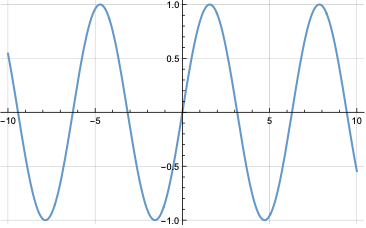
If you need to visualize a function to quickly check your intuition, Tungsten can generate a plot using the WolframEngine, with the :TungstenPlot command.
An example of the plot generated using an input of \sin x is shown underneath.
Using LaTeX as a source language
Options exist for integrating a "CAS" such as python or luacas into Neovim documents.
These programs are great and definitely have a use-case, however, they both suffer from thinking tax as they require you to restate your LaTeX-formatted expression in their syntax.
Also, luacas does not insert the result into the editor but only the output .pdf file, meaning you cannot easily post-process the result.
To avoid paying thinking tax, Wolfram decouples the source language (what you type) from the backend language (what does the math).
Under the hood, Tungsten does the following each time you run a command:
- Parsing: A custom-built Lua-parser builds an Abstract Syntax Tree (AST) based on the LaTeX-formatted input from the buffer
- Transpiling: It converts that AST into an expression the backend understands (currently only the Wolfram Engine however Python support is being built)
- Execution: It sends the transpiled expression to the backend, which handles the command asynchronously
- Rendering: The result returns, is converted back into LaTeX, and displayed inline.
For an input such as:
\int_{0}^{\infty} \frac{1 + x}{\sin(x)} \, \mathrm{d}x
The resulting AST will be:
definite_integral
│ ├─upper_bound: symbol
│   └─name: infinity
│ ├─lower_bound: number
│   └─value: 0
│ ├─variable: variable
│   └─name: x
  └─integrand: fraction
  │ ├─denominator: function_call
  │ │ ├─args: <table>
  │ │   └─[1]: variable
  │ │     └─name: x
  │   └─name_node: variable
  │     └─name: sin
    └─numerator: binary
    │ ├─operator: +
    │ ├─left: number
    │   └─value: 1
      └─right: variable
        └─name: x
This is then converted to the following WolframScript string that is then sent off to the Wolfram Engine:
Integrate[(1 + x) / (Sin[x]), {x, 0, Infinity}]
Preserving Flow State
The primary design principle behind Tungsten was that it should support flow state during math writing, also when that involves CAS-tools. This also means that an important feature of Tungsten is its utilization of Neovim's asynchronous job control system.
As Neovim is single-threaded, if I simply shelled out a wolframscript command and waited for a response, the editor would hang for 500 ms or more every time I wanted to evaluate an expression.
That is friction and therefore thinking tax.
To avoid this Tungsten uses Neovims wide support for asynchronous jobs, allowing computations to run in the background. You simply send off a command and keep typing. When the answer arrives, it is inserted into the buffer in an instant such that your workflow is never obstructed. The result being inserted into the buffer allows you to post-process it in any way you might want for it to be in the same style or format as the rest of your document.
What is Tungsten not?
To manage expectations, it is important to clarify the scope of Tungsten.
- It is not a full replacement for a CAS: If you are doing heavy simulations or data processing a LaTeX-document simply is not the right place to do that, and the right tools should be used.
- It is not a standalone application: It only runs in Neovim and therefore requires you to write LaTeX-documents in Neovim. To get convinced to start writing LaTeX using vim/Neovim check out the great blog posts about the matter by Gilles Castel. For a more in-depth guide on how to setup Neovim and get started writing LaTeX see ejmastnak's Guide to supercharged mathematical typesetting.
Try it out
If you have the Wolfram Engine installed or do not mind installing the engine and acquiring a free license and use Neovim, give Tungsten a try.
I am actively looking for LaTeX-expressions that break the current parser, such that it can be made even better. If you break the parser using syntax you believe is accurate and should be supported please let me know.
- GitHub Repo: github.com/b1gum/tungsten
- Documentation: bigum.dev/tungsten/
- Installation: bigum.dev/tungsten/introduction/installation/